Showing posts with label news. Show all posts

Windows Phone 8.1 Features and Release Date

By // 1 comment:
Microsoft officially unveiled the latest revision of its mobile platform - Windows Phone 8.1. The new release brings a lot of new features and improvements to the OS. Most of those you already know from the numerous leaks through the pre-release SDK, but here's the full list.

Cortana – Windows Phone’s personal virtual assistant

Windows Phone 8.1 brings its own virtual personal assistant called Cortana. With Android having Google Now and Apple boasting Siri, it was about time Microsoft also joined the native personal assistant to Windows Phone.
The Bing-powered Cortana plays an important role in WP 8.1 letting you set reminders, calendar events, call people, give you information about places you have or plan to visit. She also knows sports, gives weather info and basically everything you would expect from a virtual assistant. She’s going to be accessible through the Search key and features advanced voice recognition. This allows you to ask Cortana to search the web as well.
Cortana is also able to feed you custom notifications based on your personal information and usage data, should you allow it, much like Google Now. At launch, Bing and Foursquare are going to be feeding Cortana with information for places and events, but more online services will follow soon.
Joe Belfiore confirmed Cortana will be available in the US at first with the UK and China second. Other countries will follow later on.

Action Center

Windows Phone 8.1 finally gets a dedicated notification center called Action Center. It holds customizable quick setting toggles, which include brightness adjustment, location settings, rotation locks, Wi-Fi and Bluetooth on and off among others. Below that you get a notification drawer with a full list of ongoing notifications such as email, text messages, missed calls and even notifications from Cortana.

Updated lockscreen and custom tile backgrounds

Thanks to new open APIs, Windows Phone 8.1 allows applications to take control over the lockscreen and change the theme or alter its functionality altogether.

Joe Belfiore demonstrated a bunch of cool lockscreens, which displayed custom calendar entries with nice designs.
The other great customization feature is the option to set up custom backgrounds for the Start screen tiles. Small, but totally needed feature to make Windows Phone truly personal.
Another UI change means that you will now be able to select whether to have a third live tile column on the Start screen. Previously, this was set only by the phone manufacturer, so it's cool Microsoft lets the user make this decision in WP 8.1.

Internet Explorer 11

Windows Phone 8.1 ships with the latest version of Internet Explorer. IE 11 brings reading view, which grabs websites and extracts their text for easier reading. It also comes with a tuned up password manager, which will sync your passwords across multiple devices.
There’s also an InPrivate mode enabling incognito browsing. It doesn’t make you invisible on the web, but rather disable history storing and cookie information is deleted once an incognito tab is closed.
Users are now able to upload files through IE 11, with the browser also supporting WebGL and YouTube’s HTML5 video player.

Enterprise and security

The latest instalment of Windows Phone comes with VPN support. Now, you can punch in your VPN settings into the phone and surf the way more securely. WP 8.1 also supports S/MIME, which allows you sign and encrypt your email.

Sense apps

Microsoft hasn’t forgotten about its Sense apps and has added a few cool features to them. Battery Power Sense is the familiar app that tracks what software uses the phone’s resources most and gives you a handy overview of how your phone’s battery gets drained. Naturally, you can do something about it thanks to the Battery Saver option, which has app exclusion list.

Data and Wi-Fi Sense will give you greater control over how you use your network. Wi-Fi Sense is a cool new addition that gives you the ability to share the internet connectivity of your secured Wi-Fi networks with your Skype, Facebook and Outlook contacts without having to give the password. It also allows you to find and connect to free open Wi-Fi networks automatically.

Misc features

On-screen keys
Just as a couple leaked screenshots suggested earlier, Windows Phone 8.1 now features on-screen software keys – Search, Start and Back. This means the requirement for hardware keys below the screen is a thing of the past
Quiet hours
Now in Windows Phone 8.1 you can set any period of the day when you want only a certain group of people to be able to reach you. This feature is called Quiet hours and is accessible from the Settings.
Wordflow Keyboard
A new option in the Windows Phone 8.1 keyboard is called Wordflow - a Swype-like input method allowing you to quickly input words by swiping through the letters. Joe Belfiore says it's so good that in fact it has set the new Guinness World Record for fastest writing on a smartphone, dethroning the Galaxy S4.

Availability

The Windows Phone 8.1 update will be officially released in a few months (that's as specific as Microsoft got), while new devices running it will start shipping in late April/early May. It's not specified which WP8 handsets will be treated to the update at this point, but we guess the list will be quite extensive.
And if you are registered Microsoft developer, you will be able to get an early glimpse on the update as early as April 10.
Developing...
For Any help and Information Follow me on Facebook , Google+ , Twitter


Windows 8.1 Update 1 said to be arriving on March 11

By // No comments:
Microsoft will be releasing an update to the current Windows 8.1 OS, tentatively called Windows 8.1 Update 1, on March 11, according to ZDNet. The update will brings several under the hood changes, as well as a bunch of user facing ones that will help bridge the gap between the desktop and ‘Metro’ modes.
One of the new changes said to be present in Update 1 is the ability to pin Metro-style apps to the taskbar in the desktop mode. This will allow you to launch those app quickly just as you would a standard desktop app. You can also hover over the icons of minimized apps to see a thumbnail preview. Lastly, Metro-style apps are also said to get a close button that will make it easier and more obvious on how to quit an app.
As far as under the hood changes are concerned, Update 1 will feature reduced memory and disk space requirements, which will enable it to work better on cheap small tablets.
The update should be free and will be provided through Windows Update.

Windows 9 to be Released in April 2015

By // No comments:
Microsoft is on the Threshold of making a major announcement about its next operating system. Windows 9 is coming soon — and Microsoft is hoping that it gives users a warm, Windows 7 feeling inside.
According to a new report from Paul Thurrott, Windows 9 will arrive early in 2015. That’s no surprise given that it’s generally about three years between major releases. Windows 7 came out about 34 months after Vista. Windows 8 landed just four days after Windows 7′s three-year anniversary.
Thurrott says that Microsoft is aiming for an April release, which would be about six months ahead of the established schedule. Windows 8 and 8.1 adoption remains disappointing, however, and the company wants to move forward more quickly this time around.
There will be three milestone releases throughout the final development period, which is due to kick off in the coming months. Expect an announcement about Windows 9 at Build 2014 in April.
Downloads will come later on. Thurrott says that any news at Build will focus on Microsoft’s vision for Windows 9 — like how it’s going to better serve users who are content to use the desktop but still want to install the occasional Metro app. They’ll reportedly be able to run in windowed mode alongside your desktop apps in Windows 9, which will help minimize Windows 8′s sometimes-jarring dual UIs. Some form of Start Menu may make a comeback in Windows 9, too.
Microsoft is also working to overhaul the Metro/Modern design language. That may have something to do with platform unification. Don’t forget, Microsoft is planning on having only two operating systems to maintain soon.
Presumably that means Windows RT and Windows Phone will merge, and Microsoft will want to make sure that it’s easy for developers to code once and deploy everywhere. Very little has been said about this so far, but perhaps the Windows 9 announcements at Build will shed some light.

How to Use Two Different Profile Picture in Facebook

By // No comments:


Hello Friends, Today Im back with a cool facebook trick, which allows you to use two different profile picture at the same time.

Thanks to Khalil (Security Researcher) Shared this trick on his website and last year Khalil hacked Mark Zuckerberg Profile Page.


How To Use Two Different Profile Picture At Same Time on Facebook

  • First of all log-into your account.
  • Then Open This Link  
  • Now, Open Profile Pictures Album and Open a photo that you want use as main profile picture
  • After opening photo, Check for its Fbid ID (You Can find Fbid ID on url)
Trick-To-Use-Two-Different-Profile-Picture-in-Facebook

  • Copy Your Photo's FBID ID (i.e This is my photo fbid id 419771021427542)
  • Now Time to change your profile picture, Go to your profile and click on your current picture and Click on Edit Profile Picture > Edit Thumbnail > Now Right click on your small profile picture and select Inspect Element 
Trick-To-Use-Two-Different-Profile-Picture-in-Facebook
  • Scroll Down Inspect element and find this Code                                                                          <form action="https://upload.facebook.com/save_square_pic.php" 
  • Now Click on small array button and it will display some codes. (Check the below picture to understand clearly)
Trick-To-Use-Two-Different-Profile-Picture-in-Facebook

  • Here You need to replace Photo FBID ID (Value) with Copied FBID ID
  • Simply Double Click on Value and paste FBID ID
  • Now Hit Enter and Click on Save Button. That's it Your DONE!!
For Any help and Information Follow me on Facebook , Google+ , Twitter

Top Countries With World’s Fastest Internet

By // No comments:
1. Hong Kong – 65.1Mbps
Maintaining its position as the country with the fastest internet, Hong Kong is still the no. 1 on the list with peak speed of 65.1Mbps. Although this is 0.9 per cent fall as compared to past quarter, but it is a 32 per cent growth as compared to last year.
2. South Korea – 53.5Mbps
South Korea gains two spots to secure the No. 2 spot this time with its peak internet speed of 53.3Mbps. The speed shows a growth of 19 per cent over the past quarter and 14 per cent over last year.
3. Japan – 48.8Mbps
Loosing one place Japan now sits on third position with highest speed of 48.8Mbps. This is an increase of 3.1 per cent compared to the previous quarter and 21 percent compared to last year.
4. Romania – 47.5Mbps
On No. 4 is Romania with 47.5Mbps highest speed. This is a 0.6 per cent growth over the previous quarter and a 23 per cent growth over 2012.
5. Singapore – 45.6Mbps
On fifth spot rests Singapore, with maximum speed of 45.6Mbps. This is a brilliant growth of 61 per cent over last year and 4.1 per cent over last quarter.
6. Latvia – 44.6Mbps
Rolling down one place Latvia stands on No. 6 with its peak internet speed of 44.6Mbps. This is an increase of 5.4 per cent since the last quarter and 33 per cent from last year.
7. Switzerland – 41.4Mbps
Switzerland holds the seventh spot on the list with its top speed of 41.4Mbps. This translates into a rise of 3.9 per cent in past quarter and 38 per cent over the past year.
8. Israel – 40.1. Mbps
Yes we are not kidding, despite the country was not there in the top 10 last quarter, Israel this time secured the eight spot with its top speed touching 40.1Mbps. This is a 53 per cent growth over last year and 6.4 per cent compared to the preceding quarter.

Android 4.4 coming to 10 Micromax smartphones

By // No comments:
The Indian cell phone manufacturer Micromax doesn't immediately come to mind as a top player in the cell phone game, but it is sure putting forth an effort to keep its Android handsets up to date.
An internal document reveals that the number 2 Indian cell phone maker will upgrade 10 of its handsets to Kit Kat: the A250, A240, A210, A200, A116, A116, A116i, A111, A110Q, and A110. The leak doesn't indicate a timeframe for the updates, however.
Micromax is best known for its Canvas series of phones. The upcoming Canvas Turbo is being heavily promoted with the help of Hugh Jackman, which most of you probably know as the Wolverine. The Australian actor was named the company's brand ambassador back in October.
Celebrity endorsements aside, Micromax should expect a steady growth if it continues to produce quality handsets, with constant updates, at affordable prices.

Aircel 4G is coming to India

By // No comments:
Aircel has appointed China’s ZTE Corporation to supply and deploy its 4G network in India.Aircel would start 4G LTE trial starting from Chennai by the end of 2013. Now Aircel has announced that LTE deployment will be initiated in Chennai, Rest of Tamil Nadu (RoTN) and few other business critical circles.
Regarding the new partnership, Xu Dejun, Chief Executive Officer of ZTE India, said
We are happy to partner with Aircel to roll out their 4G LTE network in India. We are fully committed to plan, design, supply and deploy state-of-the-art LTE ecosystem which will help Aircel offer unprecedented experience to their customers. In the initial phase of our rollout, we aim to offer our customers some of the highest data speeds in the country — in excess of 65 Mbps.
Anupam Vasudev, CMO, Aircel, said
We believe that data is the growth engine of the future and a cutting-edge technology such as 4G LTE has the ability to empower consumers like never before. The huge demand for Internet-enabled devices such as smartphones and tablets among the largely young population, along with increase in consumption of data on Internet and rising demand for content are some of the factors fuelling the exponential growth in data.
Aircel has 20 MHz spectrum on 2300 MHz in 8 circles including Andhra Pradesh, Tamil Nadu (including Chennai), West Bengal, Bihar, Odisha, Assam, North-East and Jammu & Kashmir. Aircel did not announce when it plans to begin their 4G LTE roll out. Reliance Jio is also expected to roll out 4G LTE in 2014.

All new Windows 8 Shortcuts

By // No comments:
Windows key – brings up the Metro start screen. You can start typing to search for an app, just like the Win 7 start menu.
Win + D – brings up the old Windows desktop.
Win + C – brings up the Charms menu, where you can search, share, and change settings.
Win + I – opens the Settings panel, where you can change settings for the current app, change volume, wireless networks, shut down, or adjust the brightness.
Win + Z – opens the App Bar for the current Metro application.
Win + H – opens the Metro Share panel.
Win + Q – brings up the Metro App Search screen.
Win + W – brings up the Metro Settings search screen.
Win + F – brings up the Metro File search screen.
Win + K – opens the Devices panel (for connecting to a projector or some other device)
Win + , (comma) – Aero Peek at the desktop.
Win + . (period) – Snaps the current Metro application to one side of the screen. (Right side)
Win + Shift + . (period) – Snaps the current Metro application to the other side of the screen. (Left side)
Win + J – switches focus between snapped Metro applications.
Win + Page Up / Down – moves the current app to the other monitor.
Win + Tab – opens the Metro application switcher menu, switches between applications.
You might notice that we didn’t show screenshots of how all these shortcut keys work, and there’s a reason for that: you need to test them out for yourself to really learn how they work.
Win+X – lunch kind of start menu, very useful
Windows Key + Print Screen saves a screenshot into your Pictures folder. It’s quite handy.

All about 4G networks?

By // No comments:
1)4G will be a fully IP-based integrated system.
2)This will be capable of
providing 100Mbit/s and 1 Gbit/s speeds both indoors and outdoors.
3)It can provide premium
quality and high security.
4)4G offer all types of services at
an affordable cost.
5)4G is developed to provide high quality of service (QoS) and rate requirements set by forth coming applications such as wireless broadband access, Multimedia Messaging, Video Chat, Mobile TV, High definition TV content, DVB, minimal service like voice and data, and other streaming services. 4G technology allow high-quality smooth video transmission.
6) It will enable fast downloading of full- length songs or music pieces in real time.
7) The business and popularity of 4Gmobiles is predicted to be very vast.
8) On an average, by 2019, this 4Gmobile market will be over $400B and it will dominate the wireless communications,­ and its converged system will replace most conventional wireless infrastructure.­

Top Google Searches of 2013

By // No comments:
Nelson Mandela, the former South African leader and human rights activist who died earlier this month, was the world’s top trending search on Google, according to annual data released by the tech giant on Tuesday.
The company says trending searches represent queries that “had the highest amount of traffic over a sustained period in 2013 as compared to 2012.”
The Fast and The Furious actor Paul Walker — who died last month in a car crash — was second, followed by the iPhone 5s, which launched in the fall. The complete top 10:
1. Nelson Mandela
2. Paul Walker
3. iPhone 5s
4. Cory Monteith
5. Harlem Shake
6. Boston Marathon
7. Royal Baby
8. Samsung Galaxy S4
9. PlayStation 4
10. North Korea
In the U.S., Walker’s death was the top trending search on Google, followed by the Boston Marathon bombing and Mandela’s passing. The death of Glee star Cory Monteith and the iPhone 5 round out the top five.

What is Opera Max ?

By // No comments:
Opera is working in a new service called Opera Max that will help you save data on all your apps, not just the browser. It compresses data for every image, video and text file downloaded to your device regardless of the application downloading it.
It works by installing the Opera Max application on your Android device. The app configures a VPN server on your device and routs all your data through it. The server will compress all data before sending it to your device, thus saving your data and time. This works for all apps except those that use https, so any secure content such as online payments and mail services won’t be compressed.
The service is currently in beta and Opera is looking for people in the US to test it out for them. You will find the instructions to sign up for it and the download link for the app in the source link below.

Apple seeds iOS 7.1 beta 2 to developers: here is what’s new

By // No comments:

Apple has released the second beta of iOS 7.1 to registered developers this afternoon. The update, which carries the build number 11D5115D, can be downloaded via Apple’s developer center.
Today’s release comes nearly a month after the first beta, which brought about only a handful of changes including a new ‘ dark keyboard’ feature, and other small tweaks and improvements…
The beta is available for compatible iPhone, iPad and iPod touch models. We’re installing it ourselves, and will be reporting back with any new stuff we find. So make sure to check back with us.
As always, we welcome you to let us know if you find anything that we may have missed by either e-mailing us at AnirudhPulikonda@iCloud.com, or leaving us a comment regarding the change below.

What’s new in iOS 7.1 beta 2

As we continue to dig through the new information in iOS 7.1 beta 2, we’ll be listing any major changes we find below:
Thanks juggernaut!
  • Animations are noticeably faster
  • Settings for Touch ID and Passcode have been bumped up to main menu
  • List view in Calendar has been redesigned
  • New option to turn on button shapes in iOS
  • Option to enable ‘dark keyboard’ has been removed
  • New iPad wallpapers

Google starts rolling out Android 4.4.2 to Nexus devices

By // No comments:
Shortly after the 4.4.1 update, Google has now started rolling out the 4.4.2 update for the Nexus devices. Whereas the previous update focused on improving the camera performance on the Nexus 5, the latest one merely includes bug fixes.

There is no official change log from Google but according to Sprint, the following changes have been made:
  • Fix for clearing the VM Indicator
  • Fix for delivery of the VM Indicator
  • Various additional software fixes
  • Security enhancements
The update is rolling out to the Nexus 5, Nexus 4, Nexus 7 (2012 and 2013 models) and the Nexus 10. If you didn't get the 4.4.1 update it's fine as you can directly install the 4.4.2 update as soon as it is available for you.

Qualcomm announces 64-bit, entry-level Snapdragon 410

By // No comments:
Qualcomm announced its first 64-bit mobile chipset – the Snapdragon 410. Curiously, the SoC is not a high-end powerhouse, but one designed for devices with sub-$150 price tag.
Alongside its 64-bit capability, the Qualcomm Snapdragon 410 will also bring 4G LTE connectivity to the masses. Manufactured using a 28nm process, the chipset will come with Adreno 306 GPU, as well as support for 1080p video playback and up to 13MP camera units.
Furthermore, the new silicon by Qualcomm will support Dual and Triple SIM configurations. In addition to LTE, connectivity options will include Wi-Fi, Bluetooth, NFC, and FM radio. GPS, GLONASS, and China’s new BeiDou standard will cover location services.
The Qualcomm Snapdragon 410 will support all major mobile operating systems including Android, Windows Phone and Firefox OS. Sampling of the SoC will begin by device manufacturers in the first half of 2014. The first commercially available devices are expected in the second half of the same year.

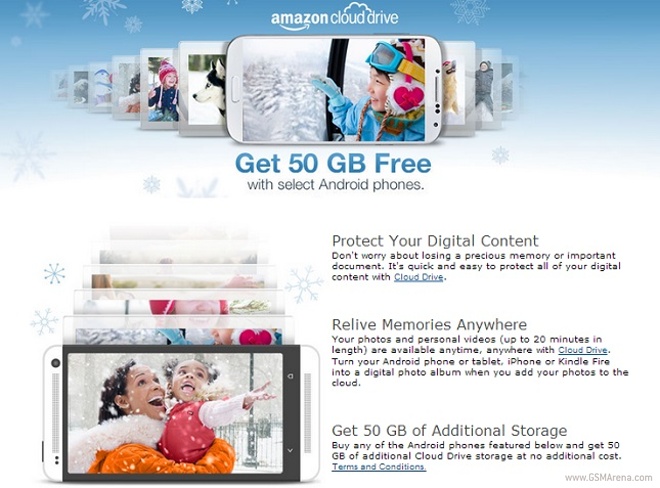
Amazon offers 50 GB of free cloud storage when you buy an Android smartphone

By // No comments:
Amazon is offering free 50 GB of cloud storage when you buy an Android smartphone from the popular online retailer. The storage space will be at your disposal for a period of 12 months.
Amazon’s offer runs out on December 31 and covers all major devices like the Samsung Galaxy S4,Samsung Galaxy Note 3HTC OneLG G2 and Motorola Moto X as well as a huge number of less popular smartphones.
All you have to do to claim your free storage is to buy any of the smartphones that are listed on the Amazon’s offer page and the 50 GB of cloud storage will be added to your account with in the next 10 days.
Check out the source link below to know more about Amazon’s cloud drive promotion.

Assassin’s Creed Pirates will be hitting Windows Phone soon

By // No comments:
Ubisoft released Assassin’s Creed: Pirates for Android and iOS yesterday turning a hard shoulder to Windows Phone users hoping to get access to the game. However, according to Assassin’s Creed France team, the game is actually coming to WP.
On its Facebook page, the member of the Ubisoft’s team confirmed that the Windows Phone version of the game is in development. Despite not providing a specific time frame of the game’s release, the news is definitely good for fans of the franchise.
Assassin’s Creed: Pirates utilizes a new 3D graphics engine, designed specifically for mobile devices. The game will be focused on naval battles – it will allow users to command a ship and square off against enemies while on a quest for treasure. Players will be available to upgrade both their ship and their crew members. Some of the characters from Assassin’s Creed 4: Black Flag will also appear in the game.
The game is currently be available for iOS and Android devices 5 for $4.99.

Google Play app update now rolling out, brings minor UI changes

By // No comments:
Google has started rolling out an update to the Google Play app on Android, which brings with it some minor but useful changes. One of the changes is the way your app ratings now appear. The stars for the rating have been made larger and more prominent and the edit button for user reviews is also highlighted on the side once you leave a review. There is now also an option to delete your review if you wish.
Another addition is that Google Play will now show you if an app has in-app purchases. It won’t show you the items that are available for purchase the way iTunes does but at least you now have an idea if an app has IAP before downloading it.
Lastly, the new Google Play also maintains your activity on the Store, including things like your purchases, the ratings you give and your +1s, which can then be shared on Google+ for your friends to see.
The update is rolling out now and as usual will take some time to reach every device but if you’re impatient you can grab the APK from the source link below.

Microsoft revamps Bing for Android with new features

By // No comments:
Microsoft has revamped its Bing app for Android platform and the latest version now comes with a redesigned UI along with a host of new features.
Bing for Android now has the ability to set daily Bing images as your Android wallpaper to make your smartphone look a lot cooler.
The pinch to zoom in and zoom out feature that was not functioning as expected while browsing through the web pages has been fixed. The update also kills a lot of crash bugs and the app is a lot smoother now.
Bing for Android now lets you add widgets to your home screen, share web pages with your social network, save your favorite search results and web pages as screenshots and you can also sync your bookmarks and screenshots with SkyDrive.
The updated version of Bing for Android can be downloaded from the source link below.

Samsung launches the first 1TB mSATA SSD

By // No comments:
Samsung announced today the first mSATA SSD drive of 1TB capacity. The drive is from the EVO 840 family and is destined to find a new home in ultrabooks, but will also fit virtually anywhere you place it – be it your home PC or a laptop.
The 1TB mSATA EVO 840 SSD is capable of reaching 540MB/s and 520MB/s of read and write, respectively. Random read/write speeds are rated at 98,000 and 90,000 IOPS.
Samsung has managed to fit so much capacity into the small form factor by adding 4 groups of 16 128Gb NAND flash memory chips. They’re based on the 10nm manufacturing process and are separated into four packages onto the plate. Samsung also bundles the drive with the Samsung Magician 4.3 software suite, which can boost the drive to go as fast as 1000MB/s sequential read speed in RAPID mode.
Pricing is yet to be detailed, but Samsung has shared that the 1TB mSATA EVO 840 SSD is going to be available globally starting this month. If 1TB is too much for you, Samsung will also offer the 840 EVO mSATA in 120, 250 and 500GB flavors.

Rate This film 10 For me

Swades (2004) on IMDb

Follow me on Twitter

My Blogger TricksAll Blogger TricksAll Blogging Tips

Popular Posts